

Most business AI is designed around what it can do. A better starting point is when it deserves to interrupt someone. A useful assistant can draft, sort and prepare quietly; a careless one turns every uncertainty into a notification. AI interruption design is the discipline of protecting a team’s attention while making sure consequential moments still reach a person in time.
Table of Contents
Attention is an operating cost
Every interruption asks a person to drop context, decide whether the issue matters, and reconstruct enough of the situation to respond. That cost is easy to hide when an AI assistant is new. The system looks responsive because it reports everything. The team feels informed for a week, then begins to mute, defer or ignore it.
That is not a people problem. It is a product-design problem. Operations teams have long used severity conventions to distinguish routine events from incidents that require action; the IETF’s syslog severity model is a useful reminder that not every signal deserves the same response. Business AI needs an equally deliberate vocabulary.
For a website assistant, an unfamiliar question may be valuable evidence but not an emergency. A request to alter a confirmed order may need a human now. A missing source behind a price claim may mean the assistant should simply stop making that claim until the source is restored. These are different events, and they should feel different to the person on the receiving end.
AI interruption design needs clear lanes
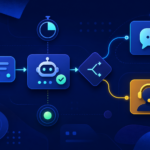
The first move is not another dashboard. It is a small set of lanes that makes the assistant’s behaviour predictable. In AI interruption design, four lanes are often enough to start:
- Handle quietly: low-risk work with an approved outcome, such as classifying a routine enquiry or preparing a draft.
- Bundle for review: patterns that matter but do not require immediate action, such as several visitors asking for the same missing comparison.
- Ask for a decision: a bounded choice with evidence attached, such as whether to approve an exception to a stated policy.
- Interrupt immediately: an event with a real deadline, a safety implication, or a customer commitment that cannot wait.
Set a response promise for each lane before launch. An immediate interruption might name a backup person and a fifteen-minute target; a decision request may expire after a business day; a bundled item belongs in a named weekly review. The quiet lane also needs a boundary: record what the assistant completed so a team can inspect it later without being asked to watch every step in real time. That is how AI interruption design protects attention without hiding work.
The distinction between “bundle” and “ask” matters. A bundle says, “Here is something worth noticing when you have a review window.” An ask says, “The workflow cannot responsibly continue without your choice.” This is more specific than a generic escalation and less disruptive than treating all uncertainty as urgent.
That framing complements a designed AI review queue: the queue gives exceptions a home, while the interruption policy decides which exception may claim someone’s attention now. It also keeps a customer-facing assistant honest. If the correct lane is “ask,” the product should say it is checking rather than pretend a fast answer is better than a reliable one.
Design the interruption, not just the alert
An alert that says “needs review” transfers all the work to the human. A well-designed interruption arrives with a decision already framed: what happened, why it matters, what evidence is available, what will happen if nobody responds, and the smallest safe next choice.
Imagine a site visitor asking for an installation date outside normal service hours. Instead of firing a vague alert to a shared inbox, the assistant can provide the visitor’s stated location, the relevant availability rule, the proposed response, and a deadline for reply. The person can approve, adjust or route it. The interruption is no longer a transcript; it is a compact operating surface.
This is where AI output contracts become practical. If every decision request has a stable shape, people learn what to scan first. If an assistant uses browser notifications, it should also respect the platform’s permission model; the W3C Notifications specification treats permission as an explicit boundary, not an assumption. The same principle applies inside a business: an agent does not earn unlimited access to attention just because it can send a message.
Make quiet work visible at the right time
Quiet automation should not become invisible automation. The answer is a rhythm of summaries rather than a stream of pings: a morning digest of unresolved customer questions, a weekly view of recurring exceptions, and a clear record of any urgent intervention. That gives leaders a way to inspect the system without making every operator its full-time supervisor.
AI interruption design is also a useful investor and operator question because it exposes whether a product is reducing work or merely moving it into attention debt. Ask to see the notification history. How many messages required action? How many were ignored? Which ones led to a better customer outcome? The answers reveal more than a polished demo.
Start with one workflow. Write down its four lanes, name who receives the immediate lane, and set a review rhythm for everything else. Then look at the decision latency around the cases that truly matter. The aim is not an assistant that is always talking. It is one that knows when silence is part of doing its job.
That is the human-first standard: automate the routine, surface the consequential, and keep people available for the decisions only people can make.
Leave a Reply