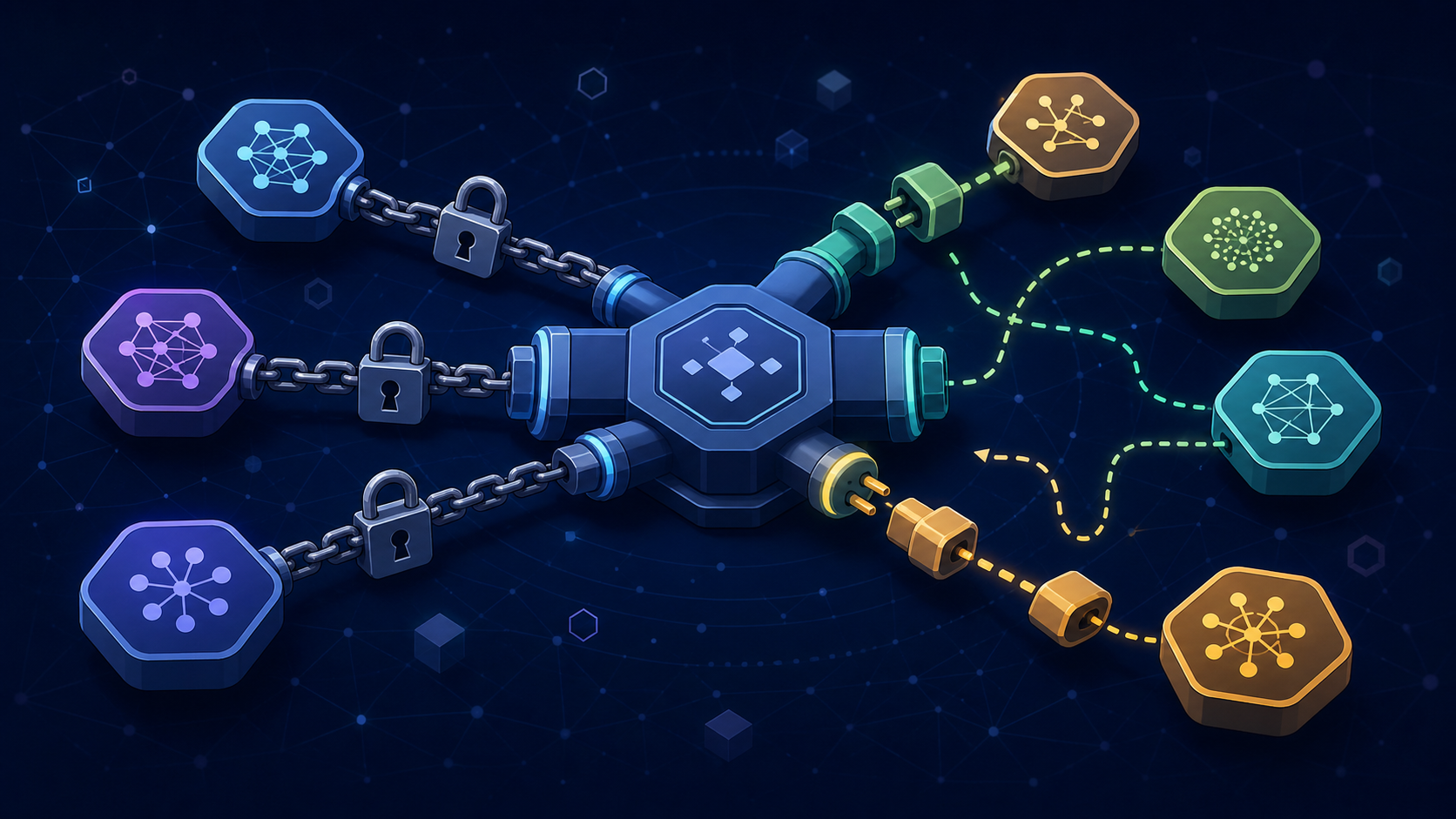
You picked a model. You wrote prompts tuned to its style. Your team built tool calls around its function format. Six months later, a competitor launches something faster, cheaper, and better. You go to switch — and discover your entire AI workflow is welded to one vendor’s quirks. That is AI vendor lock-in, and it happens quietly, one convenient decision at a time.
Table of Contents
How AI Vendor Lock-In Creeps In
Nobody chooses AI vendor lock-in on purpose. It happens because the easy path at each step happens to be the path that deepens dependency. You start with a model that works well. You tune your prompts to its particular sensitivities — maybe it likes instructions in a certain order, or responds better when you phrase constraints as questions. You wire up tool calls using its native function-calling schema. You cache responses in a format that matches its output structure.
Each decision is reasonable in isolation. Together, they form a trap. When a new model arrives that could do the job better, the cost of switching is no longer the cost of a new API key. It is the cost of rewriting prompts, reformatting tool schemas, retraining your team’s instincts, and retesting every workflow that touched the old model. For a small team, that cost can feel insurmountable — so you stay, even when staying costs you more.
This is not a theoretical risk. The AI agent moat is not the model — it is the workflow, trust, and correction layers around it. But if your workflow is so tightly coupled to one model that you cannot swap it, you have built your moat on someone else’s land. The model vendor can raise prices, change capabilities, deprecate features, or go down for a day, and you have no fallback.
The Three Layers That Trap You
AI vendor lock-in shows up in three layers. Understanding them is the first step to building portable AI workflows that resist it.
Layer 1: Prompt Coupling
Different models respond differently to the same prompt. Some prefer XML-structured instructions. Some work better with markdown. Some need explicit role definitions; others find them redundant. When you spend weeks tuning a prompt to one model’s preferences, that prompt becomes a custom dialect. Move it to another model and the output quality drops — not because the new model is worse, but because the prompt was written for a different reader.
Layer 2: Tool and Data Format Coupling
Every major model provider has their own function-calling format. OpenAI uses one schema. Anthropic uses another. Google has a third. If your agent’s tool definitions are written in one vendor’s format, switching models means rewriting the integration layer — the bridge between “what the model wants to do” and “what your systems actually do.” This is the most expensive layer to port because it touches real systems: your CRM, your database, your email, your website.
Layer 3: Workflow Logic Coupling
The deepest layer is workflow logic itself — the branching, routing, and approval decisions baked into your agent’s behavior. If your visual workflow assumes a specific model’s confidence calibration, context window size, or response latency, those assumptions become invisible constraints. You cannot see them in the prompt or the tool schema. They live in the workflow graph, and they only surface when a new model behaves differently at a branch point and the whole flow breaks.
The Portability Test
Before you build another AI workflow, run a simple test. Ask yourself: if I had to swap the model tomorrow, how much would break? Be honest. Walk through each component:
- How many prompts would need rewriting to produce the same quality on a different model?
- How many tool integrations use a vendor-specific function-calling format?
- How many workflow branches assume a specific model behavior (confidence level, response length, latency)?
- How much of your team’s muscle memory is tuned to one model’s quirks?
- Where is the data stored, and in what format — yours or the vendor’s?
If the answer to most of these is “a lot,” you have AI vendor lock-in. The good news is that portability is a design discipline, not a migration project. You build it in from the start, one decision at a time — the same way lock-in crept in.
The NIST AI Risk Management Framework identifies vendor dependency as a systemic risk worth governing. For small teams, that governance does not need a committee. It needs a habit: every time you add a model-dependent component, ask whether it would survive a swap.
Design for the Seam, Not the Model
The core principle of portable AI workflow design is simple: put a seam between your workflow and the model. A seam is a clean interface where one component can be replaced without rewriting the others. In software, this is an abstraction layer. In AI workflows, it is the boundary between “what the model does” and “what your business logic does.”
Here is what that looks like in practice:
- Normalize your prompts. Write prompts that describe the job, not the model’s preferences. Use plain instructions that any capable model can follow. Save model-specific tweaks as a thin adaptation layer — a few lines of preprocessing — not as the prompt itself.
- Abstract your tool calls. Define your tools in a model-agnostic schema, then translate to each vendor’s format at the seam. This is extra work upfront, but it means swapping models is a configuration change, not a rewrite.
- Store data in your format. Cache responses, conversation history, and structured outputs in a format you control — not in the vendor’s native response structure. Your data is your asset; the model’s output shape is ephemeral.
- Route by capability, not by brand. When you use AI as an agent rather than a copilot, model routing becomes a workflow decision. Route tasks to models based on what the task needs (speed, reasoning depth, cost), and make the routing rule explicit so it can change.
The Cloud Native Computing Foundation pioneered this thinking for cloud infrastructure: standards and abstractions that let you move workloads between providers. The same principle applies to AI. The model is infrastructure. Your workflow is the product. Keep them separate.
What to Do This Week
You do not need to redesign everything at once. Start with one workflow — preferably a boring one, as we have argued before — and make it portable. Here is a concrete sequence:
- Pick one AI workflow you run regularly. A support digest, a contact-form triage, a content draft — something bounded and checkable.
- Map where the model touches the workflow. Identify every prompt, tool call, and data format that depends on a specific vendor.
- Insert one seam. Pick the easiest coupling point and abstract it. If your prompts are model-tuned, write a clean version and save the tweaks separately. If your tool calls are vendor-specific, define them in a neutral schema.
- Test with a second model. Run the same workflow with a different model through your new seam. It does not need to be better — it needs to work. If it breaks, you have found your next seam.
- Document the swap cost. Write down what worked, what broke, and how long the switch took. This is your portability baseline. Improve it over time.
The goal is not to switch models constantly. The goal is to be able to. A team that can swap models in a day has something a team that needs a month does not: optionality. And in a market where model prices are dropping fast and capabilities are converging, optionality is worth more than any single model’s marginal advantage.
AI vendor lock-in is not a technology problem. It is a design discipline. Every seam you build is a future option you are keeping open. Every coupling you accept is a future cost you are deferring. The teams that treat the model as infrastructure — swappable, replaceable, interchangeable — will navigate the next two years of AI change from a position of strength. The teams that weld themselves to one vendor will navigate it from a position of hope.
Hope is not a strategy. Portability is.


Leave a Reply